


Authentic Apple AirPods Pro 2nd Gen Left Side Replacement A2699 - Like New Condition
$ 36.41
Description
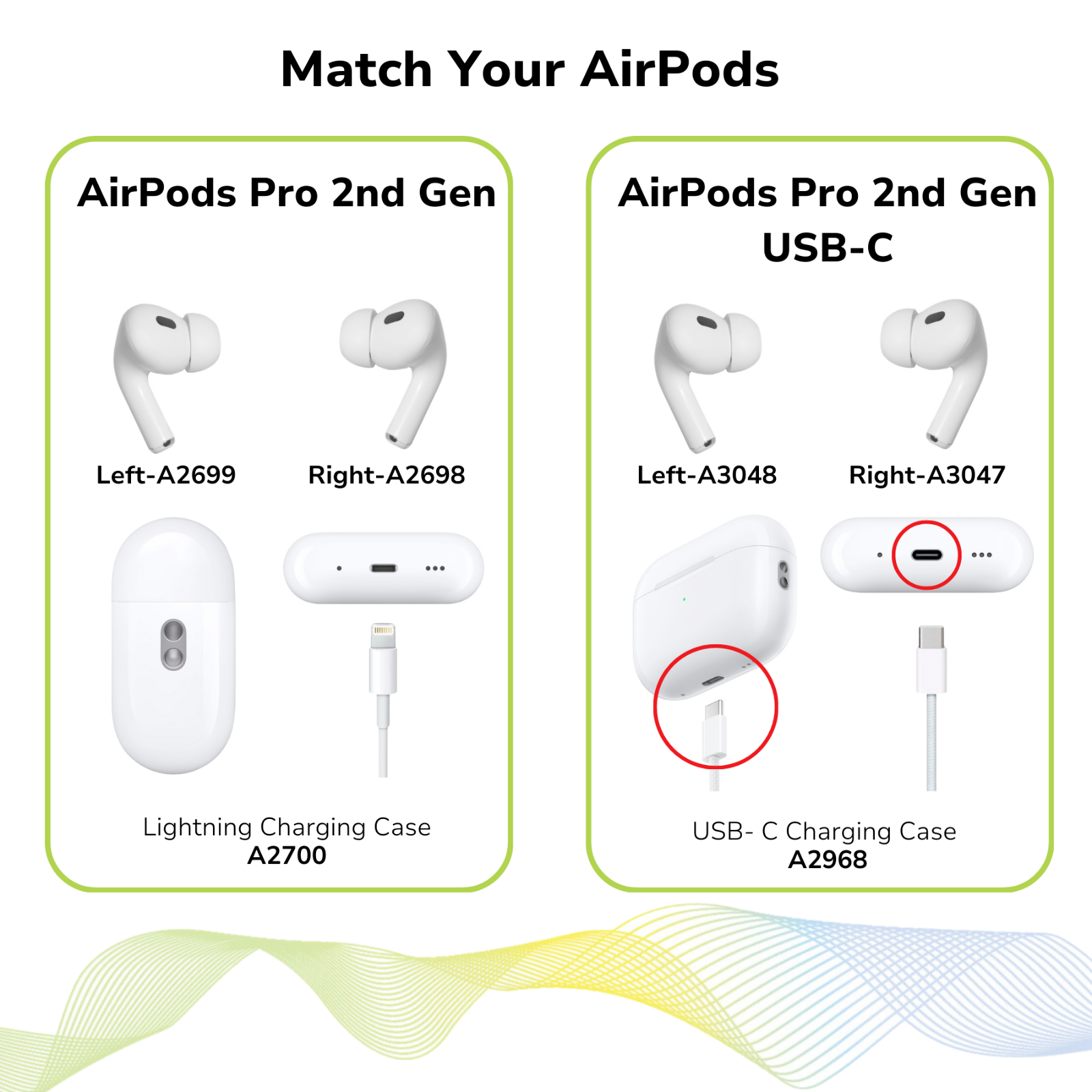
APPLE AIRPODS PRO 2ND GENERATION Left Side Only (MODEL A2699) Please note these are the AirPods Pro 2nd Generation (A2700, A2698, A2699) replacements. They are NOT compatible with the AirPods Pro 1st generation (A2190, A2083, A2084). Please check the model number of your current AirPods Pro before purchasing. REPLACEMENT LEFT SIDE (A2699) FOR YOUR AIRPODS PRO 2ND GENERATION 100% AUTHENTIC DIRECTLY FROM APPLE! Condition: Excellent Condition (9 out of 10). The unit is 100% fully functional and has been data wiped and restored to factory settings. The unit is in excellent condition with minor to no signs of cosmetic wear. The unit has been professionally inspected, tested, cleaned, and sanitized. What you will get: APPLE AIRPODS PRO 2nd Generation - Left Side ONLY (MODEL A2699) (Right Side Only. NO ORIGINAL BOX, CHARGING CASE, OR USB CABLE.) Warranty: The Apple AirPods Pro 2nd Generation is covered by the remainder of the original Apple 1-Year limited warranty or our 90-Day limited warranty, whichever is longer. Our limited warranty does not cover: cosmetic damages or defects cause by misuse, abuse, negligence or acts of God. SETUP INSTRUCTIONS provided by Apple Set up your replacement AirPods Pro or charging case When you get your replacement, follow these steps to use your AirPods Pro again: 1. Put both AirPods in your charging case and close the lid. 2. Keep the lid close. And press and hold the setup button on the back of the case for 30 seconds. 3. Connect the case to power (keeping the lid close), and wait 30 minutes. Then open the lid and press and hold the setup button again for 20-30 seconds until the status light flashes white. 4. On your iPhone, go to the Home screen. (On other phones, go to Bluetooth setting.) 5. Open the case—with your AirPods inside—and hold it next to your iPhone. A setup animation appears on your iPhone. 6. Tap Connect, then tap Done.
The order was promptly filled and shipped. I received it a couple days later with zero issues. The one thing I truly appreciated is that they included the instructions on how to connect this airpod to my existing one. Yeah, I could have done an internet search, but it's the little things like that that matter. Kudos!
Shipped quickly and works great! My dog chewed up my left ear bud and I was so nervous I couldn’t get another and this one looks brand new. Definitely recommend and worth it.
Very quick and easy set up came in perfect condition diction and quick shipping
Related products
Beats by Dr. Dre Beats Solo3 Wireless On-Ear Headphones - Matte Black For Parts
$ 15.84Beats by Dr Dre Headphones with Cord +Mic
$ 7.66Beats Studio Buds True Wireless Noise Cancelling Earbuds - Black
$ 21.12Beats by Dr. Dre Beats Solo Wireless On-Ear Headphones A1796 - Rose Gold Tested
$ 14.78